Breaking News

This is default featured slide 1 title

Go to Blogger edit html and find these sentences.Now replace these sentences with your own descriptions.

This is default featured slide 2 title

Go to Blogger edit html and find these sentences.Now replace these sentences with your own descriptions.

This is default featured slide 3 title

Go to Blogger edit html and find these sentences.Now replace these sentences with your own descriptions.

This is default featured slide 4 title

Go to Blogger edit html and find these sentences.Now replace these sentences with your own descriptions.

This is default featured slide 5 title

Go to Blogger edit html and find these sentences.Now replace these sentences with your own descriptions.

Wednesday, December 12, 2018

āφāϞো-āφāϧাāϰেāϰ āĻ—āϞ্āĻĒ “āĻĻূāϰ āĻĒāϰāĻŦাāϏিāύী"


āφāϞো-āφāϧাāϰেāϰ āĻ—āϞ্āĻĒ “āĻĻূāϰ āĻĒāϰāĻŦাāϏিāύী” āĻ•িāĻ›ু āĻ…ংāĻļ āĻŦāύ্āϧুāϰা āφāĻļা āĻ•āϰি āĻ­াāϞো āϞাāĻ—āĻŦে ।

āĻŦāύিāĻ‡ā§ŸাāĻŽিāύ āϞাāϜু
āĻ•েāĻŽāύ āφāĻ› āϤোāĻŽি?
=āϏেāϏāĻŦ āϜাāύāĻŦাāϰ āĻ…āϧিāĻ•াāϰ āϤোāĻŽাāϰ āύেāχ ।
āĻŦাāĻŦা āĻ•েāĻŽāύ āφāĻ›েāύ ।
=āϏāĻŽā§ŸāϤো āĻ…āύেāĻ• āĻšā§ŸেāĻ›ে āϜāĻŦিāύেāϰ āϏāĻ•āϞ āĻĒা⧟āύা āĻŦোāĻে āĻĒে⧟েāĻ›āϤো ।

āĻāϤো āϤীāϰ্āϝāĻ• āĻ•āĻĨা āĻŦāϞāĻ›ো āĻ•্āϝাāύো āϤুāĻŽি ।
=āĻŦাāĻ•া āϜāϞ āĻŦিāĻĒāϰীāĻĻ āĻā§œ āĻ•িāĻ›ুāχ āϤোāĻŽাāĻ•ে āφāϟāĻ•াāϤে āĻĒাāϰāϞো āύা ।āĻļুāϧু āĻļāĻ•্āϤ āĻĒাāϞ āϤোāĻŽাāĻ•ে āĻ—āύ্āϤāĻŦ্āϝে āĻĒৌāĻ›ে āĻĻিāϞো āϤাāχ āύা āĻ…āύাāĻŽিāĻ•া ।
āφāĻŦাāϰ āύ্āϝাāĻ•াāĻŽো āĻ•āĻĨা āĻŦāϞāĻ›ো ,āĻĢোāύ āϰেāĻ•ে āĻĻিāĻŦো āĻ•িāύ্āϤু ।
=āϧāύ্āϝāĻŦাāĻĻ । āĻ–ুāĻļিāχ āĻšā§ŸāϤাāĻŽ āĻŦāϰং, āĻ…āĻ–āύ্āĻĄ āĻ…āĻŦāĻļāϰে āĻļāĻ– āĻ•āϰে āĻ­াāϞোāĻŦাāϏাāϰ āύাāϏে āϝাāϰা āĻ­āύ্āĻĄাāĻŽি āĻ•āϰে āϤাāĻĻেāϰ āϏাāĻĨে āĻ•āĻĨা āĻŦāϰাāϰ āĻŦিāύ্āĻĻু āĻŽাāϤ্āϰ āφāĻ—্āϰāĻš āφāĻŽাāϰ āύেāχ ।
āĻāϤো āϰেāĻ—ে āϰেāĻ—ে āĻ•āĻĨা āĻŦāϞāĻ›ো āĻ•েāύ ?
=āĻ­ুāϞ āĻŽাāύুāώেāϰ āĻ•াāĻ›ে āĻŦিāύ⧟ী āĻšāĻŦাāϰ āĻĻৃāώ্āϟāϤা āφāĻŽাāϰ āύেāχ āĻŦāϞে ।
āϤুāĻŽি!
āĻĻেāĻļ āĻĨেāĻ•ে āϝাāϰা āĻĒাāϰি⧟ে āĻ—ি⧟ে āĻāϤো āĻŦāĻ›āϰ āĻĒāϰ āφāĻŽাāĻ•ে āĻĄিāϏ্āϟাāĻŦ āĻ•āϰে āϤাāĻĻেāϰ āĻ•āĻĨাāϰ āĻļুāύাāϰ āϧāϰ্āϝ্āϝ āĻšā§ŸāϤো āφāĻŽাāϰ āύেāχ āĻ…āύাāĻŽিāĻ•া ।
āĻĻেāĻļ āĻ›ে⧜ে āϚāϰে āĻāϏেāĻ›ি āϏāϤāϤ্āϝি,āĻ•িāύāϤু āϤোāĻŽাāϰ āϤো āϜাāύা āωāϚিā§Ž āĻ­াāϰোāĻŦাāϏা āĻ—āύ্āϤāĻŦ্āϰ āύিāϰ্āĻ­āϰ āĻ•āϰে āύা
=āϤোāĻŽাāϰ āϜāĻŦিāύেāϰ āĻ…āύিāĻŦাāϝ্āϝ āĻ…āĻŦāĻļāϰে āϝৌāĻŦāύেāϰ āωāώ্āĻŖ āϤাāĻĒে āφāĻŽাāϰ āϜীāĻŦāύেāϰ āϏāĻŽāϏ্āϤ āĻ­াāϞোāĻŦাāϏাāϰ āϏ্āĻŦāĻĒ্āύ āϧুāϞা⧟ āĻĒিāώ্āĻ  āĻ•āϰে āĻŦিāĻĻেāĻļে āĻĒা⧜ি āϜāĻŽি⧟েāĻ› āϤুāĻŽি āĻ…āύাāĻŽিāĻ•া ।āύিāĻļ্āϚিāϤ্āĻŦ āϜāĻŦিāύেāϰ āĻŦাāϰাāύ্āĻĻ্āϰা⧟ āĻĻা⧜ি⧟ে াাāĻŽাāĻ•ে āĻŦাāϞোāĻŦাāϏাāϰ āĻŦ্āϝাāĻ•āϰāĻŖ āĻŽিāĻ–াāĻ›ো āĻ…āύাāĻŽিāĻ•া !!!!
āϏāϰি āφāĻŽি āϰাāĻ–āĻŦো āĻāĻŦাāϰ ।
āĻĒাāĻ—āϞাāĻŽি āĻ•āϰোāύা āĻĒ্āϞিāϜ ।
=āĻŦāϞ āĻļুāύāϤে āĻĒাāϚ্āĻ›ি ।
āϤোāĻŽাāĻ•ে āĻ­াāϞোāĻŦেāϏে āϜীāĻŦāύেāϰ āĻāĻ•āχ āϏাāĻĨে āϚāϰāĻŽ āĻ­াāĻŦে āϰিāĻĻ্āϰ āϰিāĻ•্āϤ āĻšā§ŸেāϚি āφāĻŽি ।āĻ•িāύ্āϤ িāϤোāĻŽাāĻ•ে āĻ•িāĻ›ুāχ āĻĻিāϤে āĻĒাāϰিāύী āĻŦিāύিāĻŽā§Ÿে ।
= āϏাā§ŽāĻĒāϰ āĻŽাāύুāώ āĻ•াāχāĻ•ে āĻ•িāĻ›ু āĻĻিāϤে āĻĒাāϰেāύা ।
āĻļুāϧু āωāϞ্āϟো āĻŦোāĻ āϤুāĻŽি
āωāϞ্āϟো āϏোāϜা āϏেāχ āĻ­াāϞো āĻŦোāĻে āϝাāĻ•ে āωāϞ্āϟো āĻŦাāϤাāϏে āĻ›ুāϟāϤে āĻšā§Ÿ ।āφāĻŽি āϤোāĻŽাāĻ•ে āĻ­াāϞোāĻŦাāϏিāύা āĻ…āύাāĻŽিāĻ•া ।
āĻŽিāĻĨ্āϝা āĻŦāϞāĻ›ো āϤুāĻŽি ।āĻāĻ•āύো āϏেāχ āϤোāĻŽাāϰ āĻĻে⧟া āύাāĻŽে āĻĄাāĻ•āĻ›ো āφāĻŽাāĻ•ে ।
=āĻ…āĻŦ্āϝাāϏ āϟাāĻ•ে āĻ­াāϞোāĻŦেāϏে āĻ­ুāϞ āĻ•āϰেāĻ›ি āφāĻŽি ।
āĻ•োāύāϟা āĻ­ুāϞ ,āĻ•োāύāϟা āϏāϟিāĻ• āĻ­াāϞোāĻŦাāϏা āϏāĻŽ্āĻ­āĻŦ āύ⧟ āĻāϤা āϏāĻšāϜে āĻŦāϞা ।
=āϏāĻŽ্āĻ­āĻŦ āύ⧟ āϤাāĻĻেāϰ āϝাāϰা āĻ–োāϞāϏ āĻŦāĻĻāϞা⧟ ।
āĻ­াāϞো āĻŦāϞেāĻ›ো āϤুāĻŽি । āϤāĻŦুāĻ“ āφāĻŽি āĻŦāϞি āϤোāĻŽাāĻ•ে āϝেāύ āĻ•োāύ āĻĻিāύ āĻ–োāϰāϏ āĻŦāĻĻāϞাāϤে āύা āĻšā§Ÿ । āĻ­াāϞো āĻĨেāĻ•ো ।


Saturday, December 8, 2018

āĻāĻ• āϜāύ āĻļিāĻ•্āώāĻ•েāϰ āĻ•āϰুāύ āφāϰ্āϤāύাāĻĻ । āĻŽাāϏুāĻĻ āĻŽোāϏ্āϤাāĻĢিāϜ


āĻŦাāχāϰে āϝāϤোāχ āϚিāϞ্āϞাāϚিāϞ্āϞি āĻ•āϰেāύ, āĻŦ্āϝাāύাāϰ, āĻĢেāϏ্āϟুāύ āύি⧟ে āĻ—াāϞাāĻ—াāϞি āĻ•āϰেāύ, āϟāĻ•āĻļোāϤে āĻŦāϏে āϜ্āĻžাāύ āĻĻিāϤে āĻĨাāĻ•েāύ, āϚা⧟েāϰ āĻĻোāĻ•াāύে āĻŦāϏে āχāϏ্āϝু āĻ•āĻĒāϚা⧟ে āĻšিāϏু āĻĨাāĻŽা⧟ে āϰাāĻ–েāύ
āϝা āĻ–ুāĻļি āĻ•āϰুāύ āĻ—ে....
āĻ•্āϞাāϏে āϝāĻ–āύ āφāĻŽি āĻļিāĻ•্āώāĻ• āĻšিāϏেāĻŦে āĻĸুāĻ•ি, āϏেāĻ–াāύে āφāĻŽিāχ āύেāϤা, āφāĻŽিāχ āĻŦāϏ, āφāĻŽিāχ āĻ—ুāϰু। āφāĻŽাāϰ āϏাāĻŽāύে āĻŦāϏা, āĻĢ্āϝাāϞāĻĢ্āϝাāϞ āĻ•āϰে āϤাāĻ•ি⧟ে āĻĨাāĻ•া āĻāχ āĻ…āĻŦāϞা āĻĒ্āϰাāĻŖীāĻ—ুāϞোāĻ•ে āĻ•ী āĻļিāĻ–ি⧟ে, āĻ•ীāĻ­াāĻŦে āĻļিāĻ–ি⧟ে āĻĒāĻļুāϤ্āĻŦāĻĻেāϰ āĻĻāĻŽāύ āϘāϟি⧟ে āĻŽāύুāώ্āϝāϤ্āĻŦ āĻļেāĻ–াāĻŦো āϏেāϟা āĻāĻ•াāύ্āϤāχ āφāĻŽাāϰ āĻŦ্āϝাāĻĒাāϰ।
āύা āϜাāύāϞে āϜেāύে āϰাāĻ–েāύ,
āĻāĻ•āϜāύ āύেāϤাāϰ āĻŦāĻ•্āϤāĻŦ্āϝ āĻ•āϰ্āĻŽীāϰা āύা āĻļুāύāϞে āϏāĻ­া āĻŦāύ্āϧ āĻ•āϰা āϝা⧟, āĻāĻ•āϜāύ āĻļিāĻ•্āώāĻ•েāϰ āĻāĻ•āĻŽুāĻšূāϰ্āϤেāϰ āϜāύ্āϝāĻ“ āĻ•্āϞাāϏে āĻ…āĻŽāύোāϝোāĻ—ী āĻšāĻ“ā§Ÿা āϝা⧟ āύা। āϏāύ্āϤাāύāĻĻেāϰ āĻŦাāĻŦাāϰ āϏাāĻŽāύে āϝāϤোāϟা āύāϤāϜাāύু āĻĻেāĻ–েāύ, āĻŦাāχāϰে āϤāϤোāϟা āύা। āĻ•াāϜেāχ āĻļিāĻ•্āώāĻ•āĻ•ে āĻļুāϧু āĻŦāχ āĻļেāώ āĻ•āϰāϞেāχ āϚāϞে āύা, āϤাāĻ•ে āϤাāϰ āĻŦ্āϝāĻ•্āϤিāϤ্āĻŦāϟুāĻ•ুāĻ“ āĻŦāϜা⧟ āϰেāĻ–েāχ āĻ āĻĒেāĻļা⧟ āϟিāĻ•ে āĻĨাāĻ•āϤে āĻšā§Ÿ।
āĻ•্āϞাāϏে āĻĒাāĻ াāϞে āĻļাāϏিāϤ āĻšāĻŦে āφāĻĒāύাāĻĻেāϰ āφāĻĻāϰেāϰ āĻĻুāϞাāϞ-āĻĻুāϞাāϞিāϰা āϤাāχ āϞুāϤুāĻĒুāϤু āĻ•āϰে āĻ•োāϚিং⧟েāϰ āĻĻিāĻ•ে āύি⧟ে āϝাāϚ্āĻ›েāύ āφāĻĒāύাāϰা। āϤাāϤে āĻ•ি āĻŽাāύāĻŦিāĻ• āϜ্āĻžাāύেāϰ āĻāĻ•āϟা āĻŦাāĻ•্āϝāĻ“ āĻļিāĻ•্āώāĻ• āĻŦāϞāĻŦে? āĻŦāϞāĻŦে āύা āĻ•াāϰāĻŖ āĻ“āϏāĻŦ āĻ—āϜ āĻ—āϜাāύি āφāĻĒāύি āĻ“ āφāĻĒāύাāϰ āϏāύ্āϤাāύ āĻ•েāωāχ āύিāϤে āĻĒাāϰেāύ āύা। āĻĒ্āϰāĻ•াāϰাāύ্āϤāϰে, āφāĻĒāύাāϰ āϏāύ্āϤাāύ āϝা āĻāĻ•āϟু āĻļিāĻ–āĻ›ে āĻŦāχ āĻŦা āĻ—াāχāĻĄেāϰāχ āϜ্āĻžাāύ, āĻŽাāύāϏিāĻ• āĻŦিāĻ•াāĻļ āĻ•ীāĻ­াāĻŦে āϘāϟāĻŦে āĻ“āĻĻেāϰ?
āĻ…āϰিāϤ্āϰীāϰ āĻ•āĻĨা āĻāĻ•āϟু āĻŦāϞি,
āφāĻĒāύাāϰা āĻāϤোāχ āĻĻা⧟িāϤ্āĻŦāĻŦাāύ āĻ…āĻ­িāĻ­াāĻŦāĻ•, āϤাāĻšāϞে āĻŽোāĻŦাāχāϞ āĻ•েāύ āϚাāϞাāϤে āĻĻিāϞেāύ āĻ…āϤāϟুāĻ•ু āĻŦাāϚ্āϚাāĻ•ে? āĻĻিāϞেāύ āϤো āĻĻিāϞেāύ, āĻāĻ•েāĻŦাāϰে āĻĒāϰীāĻ•্āώাāϰ āĻšāϞ āĻĒāϰ্āϝāύ্āϤ āύāĻ•āϞāϏāĻŽেāϤ āϚāϞে āĻāϞো, āϟেāϰāĻ“ āĻĒেāϞেāύ āύা? āύাāĻ•ি āφāĻĒāύাāϰাāĻ“ āĻĒāϰীāĻ•্āώাāϰ āϰাāϤে āϏāύ্āϤাāύেāϰ āĻ­āĻŦিāώ্āĻ¯ā§Ž āĻ—ā§œাāϰ āĻ•াāϰিāĻ—āϰ āĻšā§Ÿে āĻĢেāϏāĻŦুāĻ•, āĻšো⧟াāϟāϏ āĻ…্āϝাāĻĒে āĻĒ্āϰāĻļ্āύ āĻ–ুঁāϜāϤে āĻĨাāĻ•া āĻ…āĻ­িāĻ­াāĻŦāĻ•? āϝāĻĻি āϤাāχ āĻšā§Ÿে āĻĨাāĻ•েāύ, āϤাāĻšāϞে āφāĻŽাāϰ āĻ•িāĻ›ুāχ āĻŦāϞাāϰ āύেāχ। āφāϰ āĻš্āϝাঁ, āĻ…āϰিāϤ্āϰীāĻ•ে āϐ āĻļিāĻ•্āώāĻ• āĻ…āĻĒāĻŽাāύ āĻ•āϰাāϰ āϏাāĻĨে āϏাāĻĨেāχ āφāϤ্āĻŽāĻšāϤ্āϝা āύিāĻļ্āϚ⧟āχ āĻ•āϰেāύি, āĻŦাāϏা⧟ āύি⧟ে āφāĻĒāύাāϰাāĻ“ āϤāĻ–āύ āĻ…āϤি āϏāϚেāϤāύ āĻ…āĻ­িāĻ­াāĻŦāĻ• āĻšā§Ÿে āĻļিāĻ•্āώāĻ•েāϰ āĻŦāϰ্āϤাāύো āĻĻোāώāĻ—ুāϞো āĻ…āĻŦুāĻ āϏāύ্āϤাāύেāϰ āωāĻĒāϰ āωāĻ—ā§œে āĻĻি⧟েāĻ›েāύ āύিāĻļ্āϚ⧟āχ āĻāĻ­াāĻŦে āĻŦāϞে- "āφāϜ āϤোāϰ āϜāύ্āϝ āφāĻŽাāĻĻেāϰ āĻāĻ­াāĻŦে āĻ…āĻĒāĻŽাāύিāϤ āĻšāϤে āĻšāϞো! āĻāϜāύ্āϝ āϤোāϰ āĻĒিāĻ›āύে āφāĻŽাāĻĻেāϰ āĻāϤো āĻŦিāύি⧟োāĻ—?....." āϏāϚেāϤāύ āĻ…āĻ­িāĻ­াāĻŦāĻ•āχ āϝāĻĻি āĻšāĻŦেāύ āĻāĻ—ুāϞো āĻ•েāύ āĻŦāϞেāĻ›েāύ?
āĻŦ⧜ো āĻ•āώ্āϟ āϞাāĻ—ে, āϜাāύেāύ?
āĻšাāϤ āĻĨেāĻ•ে āĻŦেāϤ āĻ•ে⧜ে āύি⧟েāĻ›েāύ āĻ•িāĻ›ু āĻŦāϞি āύাāχ, āĻ•াāύ āϧāϰে āωāĻ  āĻŦāϏ āĻ•āϰি⧟েāĻ›েāύ āϚুāĻĒ āĻ•āϰে āĻ›িāϞাāĻŽ, āĻĒāĻ•েāϟেāϰ āĻ•āϞāĻŽāϟাāĻ“ āύা āϏāϰি⧟ে āĻšাāϤে āĻ…āϏ্āϤ্āϰ āϧāϰি⧟ে āĻĢāϟোāϏেāĻļāύ āĻ•āϰি⧟েāĻ›েāύ.... āύিāϰ্āĻŦাāĻ• āϤাāĻ•ি⧟েāĻ›িāϞাāĻŽ āφāĻŽāϰা। āϤাāϤে āĻ•ি āĻĒে⧟েāĻ›েāύ āφāĻĒāύাāĻĻেāϰ āĻŦিāĻŦেāĻ•āĻŦোāϧāϏāĻŽ্āĻĒāύ্āύ, āĻ…āύুāĻ—āϤ, āϏুāĻļৃāĻ™্āĻ–āϞ, āĻĒāϰিāĻļ্āϰāĻŽী, āĻ¸ā§Ž āϚিāύ্āϤাāĻļীāϞ āĻĒ্āϰāϜāύ্āĻŽ?
ā§Ļā§Ž/⧧⧍/⧍ā§Ļā§§ā§Ž
āϜাāĻŽাāϞāĻĒুāϰ

Tuesday, December 4, 2018

āφāϜ ā§Ē āĻĄিāϏেāĻŽ্āĻŦāϰ āϧাāύু⧟া āĻ•াāĻŽাāϞāĻĒুāϰ āĻšাāύাāĻĻাāϰ āĻŽুāĻ•্āϤ āĻĻিāĻŦāϏে


⧧⧝⧭⧧ āϏাāϞে āϟাāύা ā§§ā§Ļ āĻĻিāύ āĻ…āĻŦāϰুāĻĻ্āϧ āĻĨাāĻ•াāϰ āĻĒāϰ ā§§ā§Ŧ⧍ āϜāύ āϏেāύা āύি⧟ে āφāϤ্āĻŽāϏāĻŽāϰ্āĻĒāĻŖে āĻŦাāϧ্āϝ āĻšā§Ÿ āĻĒাāĻ•িāϏ্āϤাāύি āĻŦাāĻšিāύীāϰ āĻ—্āϝাāϰিāϏāύ āĻ…āĻĢিāϏাāϰ āφāĻšāĻ›াāύ āĻŽাāϞিāĻ•।
āϜাāĻŽাāϞāĻĒুāϰ: āϰোāĻŦāĻŦাāϰ (ā§Ē āĻĄিāϏেāĻŽ্āĻŦāϰ) āĻ•াāĻŽাāϞāĻĒুāϰ āĻŽুāĻ•্āϤ āĻĻিāĻŦāϏ। ⧧⧝⧭⧧ āϏাāϞে āϟাāύা ā§§ā§Ļ āĻĻিāύ āĻ…āĻŦāϰুāĻĻ্āϧ āĻĨাāĻ•াāϰ āĻĒāϰ ā§§ā§Ŧ⧍ āϜāύ āϏেāύা āύি⧟ে āφāϤ্āĻŽāϏāĻŽāϰ্āĻĒāĻŖে āĻŦাāϧ্āϝ āĻšā§Ÿ āĻĒাāĻ•িāϏ্āϤাāύি āĻŦাāĻšিāύীāϰ āĻ—্āϝাāϰিāϏāύ āĻ…āĻĢিāϏাāϰ āφāĻšāĻ›াāύ āĻŽাāϞিāĻ•।
āĻāϰ āφāĻ—ে ⧍ā§Ē āύāĻ­েāĻŽ্āĻŦāϰ āĻĨেāĻ•েāχ āĻŦাংāϞাāĻĻেāĻļেāϰ āĻŽুāĻ•্āϤিāϝোāĻĻ্āϧাāϰা āĻĒুāϰো āĻ•াāĻŽাāϞāĻĒুāϰ āĻ…āĻŦāϰুāĻĻ্āϧ āĻ•āϰে āϰাāĻ–ে।
ā§Ē āĻĄিāϏেāĻŽ্āĻŦāϰ āφāϤ্āĻŽāϏāĻŽāϰ্āĻĒāĻŖেāϰ āϚিāĻ ি āĻŦāĻšāύāĻ•াāϰী āĻ•িāĻļোāϰ āĻŽুāĻ•্āϤিāϝোāĻĻ্āϧা āĻŦāĻļিāϰ āφāĻšাāĻŽ্āĻŽেāĻĻāĻ•ে āĻĒাāĻ•িāϏ্āϤাāύি āĻŦাāĻšিāύীāϰা āφāϟāĻ•ে āϰাāĻ–েāύ।
āĻĒāϰে ⧍ āĻĻāĻĢা⧟ āφāϤ্āĻŽāϏāĻŽāϰ্āĻĒāĻŖেāϰ āϚ‍ূ⧜াāύ্āϤ āύোāϟিāĻļ āĻĻি⧟ে āĻ…āĻĒāϰ āĻŽুāĻ•্āϤিāϝোāĻĻ্āϧা āϏāĻž্āϜুāĻ•ে āĻĒাāĻ াāύো āĻšā§Ÿ।
āĻ āϏāĻŽā§Ÿ āĻ­াāϰāϤী⧟ āĻŦিāĻŽাāύ āĻŦাāĻšিāύী āĻ•াāĻŽাāϞāĻĒুāϰেāϰ āφāĻ•াāĻļে āĻŦেāĻļ āĻ•ā§ŸেāĻ•āĻŦাāϰ āϚāĻ•্āĻ•āϰ āĻĻিāϤে āĻĨাāĻ•ে।
āĻāĻĻিāĻ•ে, āĻ•াāĻŽাāϞāĻĒুāϰে āϏāϰ্āĻŦ‍াāϤ্āĻŽāĻ• āĻšাāĻŽāϞাāϰ āĻĒ্āϰāϏ্āϤুāϤি āύিāϤে āĻĨাāĻ•ে āĻŦাংāϞাāĻĻেāĻļেāϰ āĻŽুāĻ•্āϤিāϝোāĻĻ্āϧাāϰা। ā§Ē āĻĄিāϏেāĻŽ্āĻŦāϰ āĻŦিāĻ•েāϞ ā§Šāϟা⧟ āφāύুāώ্āĻ াāύিāĻ•āĻ­াāĻŦে āĻŽিāϤ্āϰāĻŦাāĻšিāύীāϰ āφāϤ্āĻŽāϏāĻŽāϰ্āĻĒāĻŖে āĻŦাāϧ্āϝ āĻšā§Ÿ āĻĒাāĻ•িāϏ্āϤাāύি āĻšাāύাāĻĻাāϰ āĻŦাāĻšিāύী।
 
āĻ‰ā§œāϤে āĻĨাāĻ•ে āĻŦিāϜ⧟ āĻĒāϤাāĻ•া। āφāύুāώ্āĻ াāύিāĻ•āĻ­াāĻŦে āĻŦাংāϞাāĻĻেāĻļে āĻĒ্āϰāĻĨāĻŽ āĻŽুāĻ•্āϤিāϰ āϏাāϧ āĻĒা⧟ āϐāϤিāĻšাāϏিāĻ• āĻ•াāĻŽাāϞāĻĒুāϰ।
āĻ•েāύ āĻ•াāĻŽাāϞāĻĒুāϰ āϐāϤিāĻšাāϏিāĻ•: āφāύুāώ্āĻ াāύিāĻ•āĻ­াāĻŦে āĻŦাংāϞাāĻĻেāĻļেāϰ āĻĒ্āϰāĻĨāĻŽ āĻŽুāĻ•্āϤ āĻšā§Ÿ āϜাāĻŽাāϞāĻĒুāϰেāϰ āϧাāύু⧟া āĻ•াāĻŽাāϞāĻĒুāϰ। āĻ•াāĻŽাāϞāĻĒুāϰ āĻĨেāĻ•ে āĻŽাāϤ্āϰ ⧍ āĻ•িāϞোāĻŽিāϟাāϰ āĻĻূāϰে āĻŽāĻšেāύ্āĻĻ্āϰāĻ—āĻž্āϜে āĻ›িāϞ āĻŽুāĻ•্āϤিāϝুāĻĻ্āϧেāϰ ā§§ā§§ āύāĻŽ্āĻŦāϰ āϏেāĻ•্āϟāϰেāϰ āϏāĻĻāϰ āĻĻāĻĒ্āϤāϰ। āĻ āĻĢ্āϰāύ্āϟে āĻĒাāĻ•িāϏ্āϤাāύি āĻŦাāĻšিāύীāϰ āϏāĻ™্āĻ—ে āĻ—েāϰিāϞা āϝুāĻĻ্āϧ āĻšā§Ÿ āĻŽুāĻ•্āϤিāϝোāĻĻ্āϧাāĻĻেāϰ। āĻāĻ›া⧜া ā§§ā§Ļ āĻŦাāϰ āϏāĻŽ্āĻŽুāĻ– āϝুāĻĻ্āϧে āĻ…āĻŦāϤীāϰ্āĻŖ āĻšāύ āĻŽুāĻ•্āϤিāϝোāĻĻ্āϧাāϰা।
āĻ•াāĻŽাāϞāĻĒুāϰে āĻ›িāϞ āĻĒাāĻ•িāϏ্āϤাāύি āϏেāύাāĻĻেāϰ āĻļāĻ•্āϤিāĻļাāϞী āϘাঁāϟি। āĻ āϏেāĻ•্āϟāϰে āĻŽোāϟ āĻŽুāĻ•্āϤিāϝোāĻĻ্āϧা āĻ›িāϞেāύ ⧍⧍ āĻšাāϜাāϰ।
⧧⧍ āϜুāύ āĻĨেāĻ•ে ā§¨ā§Ž āύāĻ­েāĻŽ্āĻŦāϰ āĻĒāϰ্āϝāύ্āϤ āĻŽুāĻ•্āϤিāϝোāĻĻ্āϧাāĻĻেāϰ āϏāĻ™্āĻ—ে āĻĒাāĻ•িāϏ্āϤাāύি āϏেāύাāĻĻেāϰ āĻŦিāĻ­িāύ্āύ āϏāĻŽā§Ÿে ā§§ā§Ļ āĻŦাāϰ āϏāĻŽ্āĻŽুāĻ– āϝুāĻĻ্āϧ āĻšā§Ÿ। āĻ•্āϝাāĻĒ্āϟেāύ āϏাāϞাāωāĻĻ্āĻĻিāύ āĻŽāĻŽāϤাāϜāϏāĻš āĻŽোāϟ ⧧⧝ā§Ē āϜāύ āĻŽুāĻ•্āϤিāϝোāĻĻ্āϧা āĻļāĻšীāĻĻ āĻšāύ। āĻĒাāĻ•িāϏ্āϤাāύিāĻĻেāϰ āĻĒāĻ•্āώে āύিāĻšāϤ āĻšāύ ā§Ē⧝⧭ āϜāύ āϏেāύা।


āφāϜ ā§Ē āĻĄিāϏেāĻŽ্āĻŦāϰ āϧাāύু⧟া āĻ•াāĻŽাāϞāĻĒুāϰ āĻšাāύাāĻĻাāϰ āĻŽুāĻ•্āϤ āĻĻিāĻŦāϏে āĻĒুāϏ্āĻĒāϏ্āϤāĻŦāĻ• āĻ…āϰ্āĻĒāĻŖ, āϰেāϞি,āφāϞোāϚāύা āϏāĻ­া⧟ āωāĻĒāϏ্āĻĨিāϤ āĻ›িāϞেāύ āωāĻĒāϜেāϞা āύিāϰ্āĻŦাāĻšী āĻ…āĻĢিāϏাāϰ āĻŽāĻšোāĻĻ⧟, āĻŦীāϰāĻĒ্āϰāϤিāĻ•,āĻŦীāϰ āĻŽুāĻ•্āϤিāϝোāĻĻ্āϧা, āϏāĻšāĻ•াāϰী āĻ•āĻŽিāĻļāύাāϰ (āĻ­ুāĻŽি),āĻ­াāϰāĻĒ্āϰাāĻĒ্āϤ āĻ•āϰ্āĻŽāĻ•āϰ্āϤা āĻŦāĻ•āĻļীāĻ—āĻž্āϜ āĻĨাāύা āĻ“ āĻ—āĻŖ্āϝāĻŽাāύ্āϝ āĻŦ্āϝāĻ•্āϤি।

Facebook hacking


āĻĢেāϏāĻŦুāĻ• āĻš্āϝাāĻ•!!
āωāĻĒāϰেāϰ āϟাāχāϟেāϞে āϝেāĻ–াāύে āĻš্āϝাāĻ• āĻŦāϞেāĻ›ি āϏেāĻ–াāύে āϧাāύ্āĻĻা āĻšāĻŦে।
*-āĻ•িāĻ›ুāĻĻিāύ āφāĻ—ে āĻāĻ•āϜāύ āφāĻŽাāĻ•ে āĻŦāϞāĻ›িāϞ 1āϟা āĻĢেāϏāĻŦুāĻ• āφāχāĻĄি āĻš্āϝাāĻ• āĻ•āϰাāϰ āϜāύ্āϝ। āĻ“āύাāĻ•ে āφāĻŽি āĻŦāϞāĻ›িāϞাāĻŽ āϝে āĻĢেāϏāĻŦুāĻ• āĻš্āϝাāĻ• āĻšā§Ÿ āύা। āϤো āĻĢেāϏāĻŦুāĻ• āĻš্āϝাāĻ• āύি⧟ে āĻ•িāĻ›ু āĻ•āĻĨা āφāĻĒāύাāĻĻেāϰ āϏাāĻĨে āĻļে⧟াāϰ āύা āĻ•āϰে āĻĒাāϰāϞাāĻŽ āύা।


*-āϏāĻŽ্āĻ­āĻŦāϤ āĻŦāϰ্āϤāĻŽাāύে āĻŽাāύুāώেāϰ āϏāĻŦāϚেāϝ়ে āφāĻ—্āϰāĻšেāϰ āĻŦিāώāϝ় āĻ—ুāϞোāϰ āĻŽāϧ্āϝে āĻ…āύ্āϝāϤāĻŽ āĻšāϞ āĻĢেāϏāĻŦুāĻ• āĻš্āϝাāĻ•!! āĻ•িāύ্āϤু āĻ•āĻĨাāϟিāϰ āĻŽāϧ্āϝেāχ āϝে āĻŦāĻĄ় āϧāϰāύেāϰ āĻ­ুāϞ āφāĻ›ে āϤা āĻ…āύেāĻ•েāχ āϜাāύে āύা। āĻĢেāϏāĻŦুāĻ• āĻš্āϝাāĻ•িং āĻŦāϞāϤে āĻĢেāϏāĻŦুāĻ• āĻ“āϝ়েāĻŦāϏাāχāϟ āĻš্āϝাāĻ• āĻ•āϰা āĻŦুāĻাāϝ় āϝেāϟা āĻĒ্āϰাāϝ় āĻ…āϏāĻŽ্āĻ­āĻŦ। āĻ–ুāĻŦ āĻ­াāϞ āĻŽাāύেāϰ āĻš্āϝাāĻ•াāϰ āĻ›াāĻĄ়া āĻĢেāϏāĻŦুāĻ• āĻ“āϝ়েāĻŦāϏাāχāϟ āĻš্āϝাāĻ• āĻ•āϰাāϰ āĻ•āĻĨা āϚিāύ্āϤাāĻ“ āĻ•āϰা āϝাāϝ় āύা।
*-āĻĢেāϏāĻŦুāĻ• āφāχāĻĄি āĻ•ি āĻš্āϝাāĻ• āĻ•āϰা āϝাāϝ়? āύা!!! āϤāĻŦে āĻ•াāωāĻ•ে āĻŦোāĻ•া āĻŦাāύিāϝ়ে āĻĢাঁāĻĻে āĻĢেāϞে āϧাāύ্āĻĻাāĻŦাāϜি āĻ•āϰা āϝাāϝ়। āĻāĻŽāύ āĻ•োāύ āϏāĻĢāϟāĻ“āϝ়্āϝাāϰ āĻŦা āĻŽোāĻŦাāχāϞ app āύেāχ āϝাāϰ āĻŽাāϧ্āϝāĻŽে āĻļুāϧু āφāĻĒāύাāϰ āχāĻŽেāχāϞ āĻĻিāϞেāχ āĻĒাāϏāĻ“āϝ়াāϰ্āĻĄ āĻŦেāϰ āĻ•āϰে āĻĻিāĻŦে। āφāĻĒāύি āϝāĻĻি āĻŽāύে āĻ•āϰেāύ āĻāĻŽāύ āϏāĻĢāϟāĻ“āϝ়্āϝাāϰ āφāĻ›ে āϤাāĻšāϞে āĻŦāϞāĻŦ āφāĻĒāύি āĻāĻ–āύো āĻĒ্āϰāϝুāĻ•্āϤি āĻŦ্āϝাāĻĒাāϰে āĻĒিāĻ›িāϝ়ে āφāĻ›েāύ। āĻĢেāϏāĻŦুāĻ•েāϰ āĻŦāϰ্āϤāĻŽাāύ āĻŽাāϞিāĻ• Mark Zuckerburg billion dollars āĻ–āϰāϚ āĻ•āϰে āĻĢেāϏāĻŦুāĻ•েāϰ āϜāύ্āϝ security specialist āϰেāĻ–েāĻ›েāύ। āϤাāĻĻেāϰ āĻ•াāϜ āĻšāϚ্āĻ›ে āĻĢেāϏāĻŦুāĻ•েāϰ āϤ্āϰুāϟি āĻ–ুঁāϜে āĻŦেāϰ āĻ•āϰা। āĻ•োāύ āϤ্āϰুāϟি āĻĒাāĻ“āϝ়াāϰ āϏাāĻĨে āϏাāĻĨে āϤা āĻ িāĻ• āĻ•āϰে āĻĢেāϞা āĻšāϝ়। āφāĻĒāύাāϰ āĻ•ি āĻŽāύে āĻšāϝ় āĻāϤো security āĻāϰ āĻŽাāĻেāĻ“ āĻĢেāϏāĻŦুāĻ• āφāχāĻĄি āĻš্āϝাāĻ• āĻ•āϰা āϝাāĻŦে? āύা āĻāϟি āĻ•োāύ āϏāĻĢāϟāĻ“āϝ়্āϝাāϰ āĻŦা āĻ…āύāϞাāχāύ āĻ“āϝ়েāĻŦāϏাāχāϟেāϰ āĻŽাāϧ্āϝāĻŽে āϏāĻŽ্āĻ­āĻŦ āύāϝ়। āφāϰ āφāĻĒāύি āϝāĻĻি āĻĢেāϏāĻŦুāĻ• āĻš্āϝাāĻ• āĻ•āϰāϤে āĻĒাāϰেāύ āφāĻĒāύাāĻ•ে āĻ…āĻ­িāύāύ্āĻĻāύ। āĻ•াāϰāĻŖ āϤাā§ŽāĻĒāϰ্āϝ āĻŦিāĻŦেāϚāύা⧟ āĻŦিāĻ­িāύ্āύ āϧāϰāύেāϰ āύিāϰাāĻĒāϤ্āϤা āϤ্āϰুāϟি āĻ–ুঁāϜে āĻŦেāϰ āĻ•āϰা āϞোāĻ•āϜāύāĻ•ে ā§Ģā§Ļā§Ļ āĻĨেāĻ•ে āϏা⧜ে ā§Šā§Š āĻšাāϜাāϰ āĻŽাāϰ্āĻ•িāύ āĻĄāϞাāϰ āĻĒāϰ্āϝāύ্āϤ āĻĒুāϰāϏ্āĻ•াāϰ āĻĻি⧟ে āĻĨাāĻ•ে āĻĢেāϏāĻŦুāĻ•। āĻāχ āĻĒāϰ্āϝāύ্āϤ āĻŽোāϟ ā§Šā§Šā§Ļ āϜāύ āĻāχ āĻĒুāϰāϏ্āĻ•াāϰ āĻĒে⧟েāĻ›ে, āϝাāϰ āĻŽāϧ্āϝে āĻŦাংāϞাāĻĻেāĻļেāϰ āĻĻুāχ āϜāύ āφāĻ›ে।
*-āĻ…āύāϞাāχāύে āĻ…āύেāĻ• software,mobile app,website āĻĒাāĻŦেāύ āĻĢেāϏāĻŦুāĻ• āĻš্āϝাāĻ•িং āĻāϰ āϜāύ্āϝ। āĻāĻ—ূāϞো āĻ•োāύোāϟাāχ āĻ•াāϜ āĻ•āϰে āύা। āĻāϏāĻŦ āĻŦাāύাāύো āĻšāϝ় āωāϞ্āϟো āφāĻĒāύাāϰ āϤāĻĨ্āϝ āύিāϝ়ে āϝাāĻ“āϝ়াāϰ āϜāύ্āϝ। āĻāϏāĻŦ software,website āĻ bug āĻĨাāĻ•ে āϝা āφāĻĒāύাāϰ āĻĄিāĻ­াāχāϏে āĻĸুāĻ•ে āφāĻĒāύাāϰ āϏāĻŦ āϤāĻĨ্āϝ software/website owner āĻ•ে āĻĒাāĻ িāϝ়ে āĻĻিāϤে āĻĒাāϰে। āĻĢেāϏāĻŦুāĻ• āφāχāĻĄি āϧাāύ্āĻĻা āĻ•āϰাāϰ āϜāύ্āϝ āϜāύāĻĒ্āϰিāϝ় āĻĒāĻĻ্āϧāϤি āĻšāϚ্āĻ›ে phising, keylogger, password recovery, session hijacking, man in the middle attack, brute force attack āχāϤ্āϝাāĻĻি। āĻāĻ—ুāϞো āĻ•িāĻ­াāĻŦে āĻ•াāϜ āĻ•āϰে āĻāĻŦং āĻ•িāĻ­াāĻŦে āĻāϏāĻŦ āĻĨেāĻ•ে āϏুāϰāĻ•্āώিāϤ āĻĨাāĻ•া āϝাāϝ় āϤা āφāϞোāϚāύা āĻ•āϰāĻ›ি।


*-phising āĻšāϚ্āĻ›ে āĻĢেāϏāĻŦুāĻ•েāϰ āĻāĻ•āϟি fake login page āĻŦাāύিāϝ়ে āϞিংāĻ• āϟি āϝাāϰ āφāχāĻĄি āĻš্āϝাāĻ• āĻ•āϰāϤে āϚাāύ āϤাāĻ•ে āĻĒাāĻ াāύো। āϏে āϞিংāĻ•ে āĻ•্āϞিāĻ• āĻ•āϰে āϞāĻ—িāύ āĻ•āϰāϞে āϤাāϰ āĻĒাāϏāĻ“āϝ়াāϰ্āĻĄ āφāĻĒāύাāϰ āĻ•াāĻ›ে āϚāϞে āφāϏāĻŦে। phising link āĻ—ুāϞো āĻĻেāĻ–āϞে āĻ–ুāĻŦ āϏāĻšāϜেāχ āĻŦুāĻা āϝাāϝ়। āĻŦāϰ্āϤāĻŽাāύে wapka,tk āĻāχ āϧāϰāύেāϰ āϏাāχāϟ āĻ—ুāϞো āĻĢিāĻļিং āĻāϰ āϜāύ্āϝ āĻŦেāĻļি āĻŦ্āϝāĻŦāĻšাāϰ āĻ•āϰা āĻšāϚ্āĻ›ে। āĻ•োāύ āϞিংāĻ•ে āĻ•্āϞিāĻ• āĻ•āϰে āϞāĻ—িāύ āύা āĻ•āϰāϞেāχ āĻāϟি āĻĨেāĻ•ে āϏুāϰāĻ•্āώিāϤ āĻĨাāĻ•া āϝাāϝ়। āĻ•িāύ্āϤু āφāϰো āĻ­াāϞ āĻ­াāĻŦে āĻĢিāĻļিং āĻŦ্āϝāĻŦāĻšাāϰ āĻ•āϰāϞে āφāĻĒāύাāϰ āĻŦ্āϰাāωāϜাāϰেāϰ āĻĢেāϏāĻŦুāĻ• āĻ“ā§ŸেāĻŦāϏাāχāϟ āϟি āĻĢিāĻļিং āϏাāχāϟ āĻĻি⧟ে āĻĒāϰিāĻŦāϰ্āϤিāϤ āĻšā§Ÿে āϝেāϤে āĻĒাāϰে। āĻāϟি āĻĨেāĻ•ে āϏুāϰāĻ•্āώিāϤ āĻĨাāĻ•াāϰ āϜāύ্āϝ āφāĻĒāύি āϝāĻ–āύ āĻĢেāϏāĻŦুāĻ• āĻ“āϝ়েāĻŦāϏাāχāϟে āĻĸুāĻ•āĻŦেāύ āϤāĻ–āύ āĻ–েāϝ়াāϞ āĻ•āϰāĻŦেāύ #https āϏāĻš āĻĢেāϏāĻŦুāĻ• āĻ“āϝ়েāĻŦāϏাāχāϟ āϞিংāĻ• āĻ িāĻ• āĻŽāϤো āĻĻেāĻ–াāϚ্āĻ›ে āĻ•িāύা।
*-Keylogger āĻšāϚ্āĻ›ে āĻāĻŽāύ āĻāĻ•āϟি āϏāĻĢāϟāĻ“āϝ়্āϝাāϰ āϝা āφāĻĒāύাāϰ āĻĄিāĻ­াāχāϏে āĻĸুāĻ•ে āĻ—েāϞে āĻĄিāĻ­াāχāϏেāϰ āϏāĻ•āϞ āϤāĻĨ্āϝ āϝে keylogger file āφāĻĒāύাāϰ āĻĄিāĻ­াāχāϏে āĻĸুāĻ•িāϝ়েāĻ›ে āϤাāϰ āĻ•াāĻ›ে āϚāϞে āϝাāĻŦে। āφāĻĒāύি āϝা type āĻ•āϰāĻŦেāύ āϏেāϟাāχ āϤাāϰ āĻ•াāĻ›ে screenshot āϏāĻš āχāĻŽেāχāϞে āϚāϞে āϝাāĻŦে। āĻĢāϞে āφāĻĒāύাāϰ āĻĢেāϏāĻŦুāĻ• āφāχāĻĄি āϏāĻš āϏāĻŦ āĻ•িāĻ›ুāχ āĻ–ুāĻŦ āϏāĻšāϜে āĻš্āϝাāĻ• āĻ•āϰে āĻĢেāϞāϤে āĻĒাāϰāĻŦে। keylogger āĻ•োāύ āĻāĻ•āϟি āĻĢাāχāϞেāϰ āϏাāĻĨে āϝুāĻ•্āϤ āĻ•āϰে āĻĻিāϝ়ে āϝাāϰ āφāχāĻĄি āĻš্āϝাāĻ• āĻ•āϰāϤে āϚাāύ āϤাāϰ āĻĄিāĻ­াāχāϏে āĻĢাāχāϞāϟি āϚাāϞাāϞেāχ āϤাāϰ āϤāĻĨ্āϝ āĻĒেāϝ়ে āϝাāĻŦেāύ। keylogger āĻ—াāύ,āĻ›āĻŦি āχāϤ্āϝাāĻĻি āϝে āĻ•োāύ āĻĢাāχāϞেāϰ āϏাāĻĨে āϝুāĻ•্āϤ āĻ•āϰে āĻĻাāĻ“āϝ়া āϝাāϝ়। āĻāϟা āĻĨেāĻ•ে āϏুāϰāĻ•্āώিāϤ āĻĨাāĻ•াāϰ āϜāύ্āϝ āϝে āĻ•োāύ āϝাāϝ়āĻ—া āĻĨেāĻ•ে āĻ•িāĻ›ু āĻĄাāωāύāϞোāĻĄ āĻ•āϰāĻŦেāύ āύা।āĻŦিāĻļ্āĻŦāϏ্āϤ āϏাāχāϟ āĻĨেāĻ•ে āĻĄাāωāύāϞোāĻĄ āĻ•āϰāĻŦেāύ। āĻ•িāĻ›ু āĻĄাāωāύāϞোāĻĄ āĻ•āϰāϞে āϏেāϟি antivirus āĻĻিāϝ়ে scan āĻ•āϰে āϤাāϰāĻĒāϰ āϚাāϞাāĻŦেāύ।
*-Password recovery process āĻ āφāĻĒāύাāϰ āφāχāĻĄি āĻāϰ āφāĻ—েāϰ āĻĒাāϏāĻ“āϝ়াāϰ্āĻĄ āĻāĻŦং āχāĻŽেāχāϞেāϰ āĻĒাāϏāĻ“āϝ়াāϰ্āĻĄ āϜাāύা āĻĨাāĻ•āϞে āφāĻĒāύাāϰ āφāχāĻĄি āϰিāĻ•āĻ­াāϰ āĻ•āϰাāϰ āĻŽাāϧ্āϝāĻŽে āĻš্āϝাāĻ• āĻ•āϰা āϝাāĻŦে। āĻāϰ āĻĨেāĻ•ে āϏুāϰāĻ•্āώিāϤ āĻĨাāĻ•āϤে āϚাāχāϞে āφāĻĒāύাāϰ āφāχāĻĄি āĻāĻŦং āχāĻŽেāχāϞেāϰ āĻĒাāϏāĻ“āϝ়াāϰ্āĻĄ āϝেāύ āĻ•েāω āύা āϜাāύে āϏেāĻĻিāĻ•ে āϞāĻ•্āώ āϰাāĻ–ুāύ। āĻĢেāϏāĻŦুāĻ• āφāχāĻĄি āĻāĻŦং āχāĻŽেāχāϞেāϰ āĻĒাāϏāĻ“ā§Ÿাāϰ্āĻĄ āĻ­িāύ্āύ āϰাāĻ–āĻŦেāύ।
*-Session hijacking āĻšāϚ্āĻ›ে āφāĻĒāύি āĻ…āύ্āϝ āĻ•াāϰো āĻĄিāĻ­াāχāϏ āĻĨেāĻ•ে āϝāĻ–āύ āĻĢেāϏāĻŦুāĻ•ে āϞāĻ—িāύ āĻ•āϰāĻŦেāύ āϤāĻ–āύ āφāĻĒāύি āϞāĻ— āφāωāϟ āĻ•āϰাāϰ āĻĒāϰāĻ“ browser āĻāϰ saved password āĻ āĻ—ি⧟ে āφāĻĒāύাāϰ āĻĒাāϏāĻ“āĻ“াāϰ্āĻĄ āĻĒাāĻ“ā§Ÿা āϝাāĻŦে। āĻĢāϞে āφāĻĒāύাāϰ āφāχāĻĄি āĻš্āϝাāĻ• āĻ•āϰা āϝাāĻŦে। āĻāϰ āĻĨেāĻ•ে āϏুāϰāĻ•্āώিāϤ āĻĨাāĻ•āϤে āĻ…āύ্āϝ āĻ•াāϰো āĻĄিāĻ­াāχāϏ āĻĻিāϝ়ে browsing āĻ•āϰাāϰ āĻĒāϰ browser āĻāϰ cache,history,saved password clear āĻ•āϰে āĻĻিāĻŦেāύ।

*-Man in the middle attack āĻšāϚ্āĻ›ে āφāĻĒāύি āϝāĻ–āύ āĻ•োāύ wifi network/lan āĻ āĻĨাāĻ•āĻŦেāύ āϤāĻ–āύ āĻāĻ•ি wifi āĻŦ্āϝāĻŦāĻšাāϰ āĻ•āϰāĻ›ে āĻāĻŽāύ āĻ•েāω āφāĻĒāύাāϰ āĻĒাāϏāĻ“āϝ়াāϰ্āĻĄ āĻŦেāϰ āĻ•āϰে āĻĢেāϞāϤে āĻĒাāϰāĻŦে। āĻŦিāĻ­িāύ্āύ software/mobile app āĻĻিāϝ়ে āĻāχ attack wifi network āĻ āϚাāϞিāϝ়ে āĻĒাāϏāĻ“āϝ়াāϰ্āĻĄ āĻŦেāϰ āĻ•āϰে āĻĢেāϞা āϝাāϝ়। āĻāϰ āĻĨেāĻ•ে āϏুāϰāĻ•্āώিāϤ āĻĨাāĻ•াāϰ āϜāύ্āϝ vpn(virtual private network) āĻŦ্āϝāĻŦāĻšাāϰ āĻ•āϰে āφāĻĒāύাāϰ ip(internet protocol) address,mac address hide āĻ•āϰে āĻĢেāϞুāύ।
*-Brute force attack āĻšāϚ্āĻ›ে āĻāĻ•āϟি āĻĒাāϏāĻ“āϝ়াāϰ্āĻĄ āĻĄিāĻ•āĻļāύাāϰি āĻŦাāύিāϝ়ে āĻ•োāύ āϏāĻĢāϟāĻ“āϝ়্āϝাāϰ āĻŦ্āϝāĻŦāĻšাāϰ āĻ•āϰে āĻĄিāĻ•āĻļāύাāϰি āĻĨেāĻ•ে āĻāĻ•āϟিāϰ āĻĒāϰ āĻāĻ•āϟি āĻļāĻŦ্āĻĻ āϝাāϚাāχ āĻ•āϰে āĻĻেāĻ–া। āϝāĻĻি āĻ•োāύ word āφāĻĒāύাāϰ password āĻāϰ āϏাāĻĨে āĻŽিāϞে āϝাāϝ় āϤাāĻšāϞে āϏāĻĢāϟāĻ“āϝ়্āϝাāϰ āϟি āφāĻĒāύাāĻ•ে āĻĒাāϏāĻ“āϝ়াāϰ্āĻĄ āϜাāύিāϝ়ে āĻĻিāĻŦে।āĻāχ āĻĒāĻĻ্āϧāϤি āĻ…āύেāĻ• āϏāĻŽā§Ÿ āϏাāĻĒেāĻ•্āώ āĻāĻŦং āĻŦেāĻļিāϰ āĻ­াāĻ— āĻ•্āώেāϤ্āϰেāχ āĻ•াāϜ āĻ•āϰে āύা। āϤāĻŦে kali linux operating system āĻĻিāϝ়ে brute force attack āĻ•āϰāϞে āĻ•াāϜ āĻ•āϰাāϰ āϏāĻŽ্āĻ­াāĻŦāύা āφāĻ›ে। āĻāϟি āĻĨেāĻ•ে āϏুāϰāĻ•্āώিāϤ āĻĨাāĻ•াāϰ āϜāύ্āϝ āφāĻĒāύাāϰ āĻĒাāϏāĻ“āϝ়াāϰ্āĻĄ āĻ•োāύ meaningful word āύা āĻĻিāϝ়ে letters,numbers,symbols āĻāϰ āϏāĻŽāύ্āĻŦāϝ় āĻ•āϰে āĻ•āĻ িāύ āĻĒাāϏāĻ“ā§Ÿাāϰ্āĻĄ āĻĻিāύ। āϤাāĻšāϞে āĻāχ āĻĒāĻĻ্āϧāϤিāϤে āĻĒাāϏāĻ“āϝ়াāϰ্āĻĄ āĻĒাāĻ“āϝ়া āϝাāĻŦে āύা।
* āĻāĻ–āύ āφāϏুāύ āφāĻĒāύাāϰ āφāχāĻĄি āĻ•িāĻ­াāĻŦে āύিāϰাāĻĒāϤ্āϤা āĻĻিāĻŦেāύ!
āφāĻĒāύাāϰ āĻĢেāϏāĻŦুāĻ• account āĻāϰ
=login approvals,
=ode generator option on āĻ•āϰুāύ āĻāĻŦং
=trusted contacts add āĻ•āϰুāύ। āϤাāĻšāϞে āφāχāĻĄি āĻ…āύেāĻ•āϟাāχ secured āĻĨাāĻ•āĻŦে।
Written by 
boniyeamin laju
department of cse
city university.

Wednesday, November 14, 2018

āĻŦāύি āĻ‡ā§ŸাāĻŽিāύ āϞাāϜু āĻ•āĻŦিāϤা 'āφāĻŦোāϞ –āϤাāĻŦোāϞ'


āφāĻŦোāϞ –āϤাāĻŦোāϞ
āĻ•ি āĻ•ে āĻŦা āĻ•াāϰা
āĻšā§ŸāϤো āύ⧟āϤো āϝাāϰা
āϤোāĻŽাāϰ āĻŽāύ āĻĒ্āϰāĻļ্āύে āĻ­āϰা
āϏāĻŦাāϰ āφāĻŦেāĻ— āφāĻŽি āĻŦুāĻি
āĻ•ি āĻĒ্āϰāĻļ্āύ āĻ•āϰāĻŦে āϤুāĻŽি
āϜাāύি, āϤাāϤো āφāĻŽি āϜাāύি ।
āϤিāĻŽিāϰ āϰাāϤ্āϰি āύ⧟ āĻ›āϞāĻ›āϞ āφāϞো⧟
āϜোā§ŽāĻ›āύা āĻ­āϰা⧟
āĻ—্āϰāϤিāϟি āĻĒ্āϰāĻļ্āύেāϰ āĻāĻ•āχ āωāϤ্āϤāϰ
āĻ…āύাāĻŽিāĻ•া āϤোāĻŽা⧟ āφāĻŽি āĻ­াāϞোāĻŦাāϏি ।
āĻ āĻ•ি ,āĻ•েāĻŽāύ āĻ­াāϞোāĻŦাāϏা
āĻāχ āĻŦ⧟āϏে āφāĻŽি āĻŦুāĻিāύা
āϤাāϤো āφāĻŽি āϜাāύি āύা
āĻšেāϏে āύ⧟āϤো āϰেāĻ—ে āĻŦāϞāĻŦে āϤুāĻŽি ।
āĻāĻ•াāĻ•ি āωāĻĻ্āĻŽাāĻĻāύা⧟ āϤোāĻŽাāϰ āĻŦাāϤা⧟āύ āĻĻাāϰে
āĻšেāύে āφāϘাāϤ
āĻĒেāϤেāĻ›ি āĻĻুāĻšাāϤ āĻĻুāϰাāĻļা āĻŦাāϰে āĻŦাāϰে
āĻŽিāϞিāĻŦে āĻ•িāĻ›ু
āĻāϟাāχāϤো āĻ­াāϞোāĻŦাāϏা ।
āϝাāχ āĻŦāϞো āϤুāĻŽি
āĻŦāϞāĻŦো āφāĻŽি
āϝে āĻĒ্āϰেāĻŽ āϤুāĻŽি āĻļিāĻ–াāχāĻŦা
āϤা āϤোāĻŽি āĻ•োāĻĨা⧟ āĻļিāĻ–āϞা।
āϚিāύ্āϤা āύিāĻŦিāϰ ,āĻĒ্āϰāĻļ্āύ āϜāϟিāϞ
āϚāϞāύ্āϤ āĻ•āϞāĻŽ,āĻšāϞো āϏ্āĻĨিāϰ
āĻ•েāύ āϝে āĻ•āϞāĻŽ
āφāϰāϤো āϞেāĻ–āĻ›ে āύা ।
āĻŦāύি āĻ‡ā§ŸাāĻŽিāύ āϞাāϜু
āĻŦāĻ•āĻļিāĻ—āĻž্āϜ,āϜাāĻŽাāϞāĻĒুāϰ
āϤাং25/01/15 āχং


āĻĢাāϰাāĻŦি āφāĻ•্āϤাāϰেāϰ āĻ•āĻŦিāϤা “āĻĒ্āϰি⧟ āϏ্āĻŦāĻĻেāĻļ ”


āĻĒ্āϰি⧟ āϏ্āĻŦāĻĻেāĻļ 

āĻĒāĻĻ্āĻŽ āĻĢাāϰাāĻŦী 
āϤাāϰিāĻ– ঃ ā§§ā§Š/ ā§§ā§§/ ⧍ā§Ļā§§ā§Ž


āφāĻŽাāϰ āĻŽাāϤৃāĻ­ূāĻŽি, āφāĻŽাāϰ āĻĒ্āϰি⧟ āĻĻেāĻļ 
āϏে āϝে āφāĻŽাāϰ āĻĒ্āϰাāĻŖেāϰ āĻŦাংāϞাāĻĻেāĻļ।

āφāĻŽাāϰ āĻ—āϰ্āĻŦ, āφāĻŽাāϰ āĻĒ্āϰাāĻŖ 
āĻĒ্āϰি⧟ āϏ্āĻŦāĻĻেāĻļ āφāĻŽাāϰ āϜাāύ।

āĻŽা, āĻŽাāϟি, āϜāύ্āĻŽāĻ­ূāĻŽি āĻļāϏ্āϝ āĻļ্āϝাāĻŽāϞ āϏোāύাāϞী āĻĻেāĻļ 
āϏে āϝে āφāĻŽাāϰ āĻĒ্āϰি⧟ āϏāϜীāĻŦ āĻĻেāĻļ।

āĻŽেāĻ ো āĻĒāĻĨে āφāϞāϤা āϰাāĻ™া āύāĻŦāĻŦāϧু, āϰাঁāĻ–াāϞি⧟াāϰ āĻŦাঁāĻļিāϰ āϏূāϰ, 
āφāĻŽাāϰ āĻĒ্āϰি⧟ āĻŦাংāϞাāĻĻেāĻļে āĻ­āϰāĻĒুāϰ।

āϏোāύাāϞী āϧাāύ āĻšāϞāĻĻে āĻĒাāĻ–িāϰ āĻŦাāϏা, 
āϜāύ্āĻŽāĻ­ূāĻŽিāϤে āϘুāϰে āĻĻেāĻ–া āφāĻŽাāϰ āĻŦ⧜ āφāĻļা।

āĻিāϞে āĻļাāĻĒāϞা āĻĢুāϞ, āϜেāϞে āĻŽাāĻ› āϧāϰে 
āϏাāĻĻা āĻŦāĻ• āĻ‰ā§œে āĻĢুāϟāύ্āϤ āĻĒāĻĻ্āĻŽ āĻĢুāϞেāϰ āωāĻĒāϰে।

āĻĒুāĻ•ুāϰ āĻ­āϰা āĻŽাāĻ›, āĻ—ো⧟াāϞ āĻ­āϰা āĻ—āϰু 
āϚাāϰāĻĻিāĻ•ে āϏāĻŦুāϜেāϰ āĻ…āϏীāĻŽ āϤāϰু।।


Tuesday, October 30, 2018

āĻŦāύি āĻ‡ā§ŸাāĻŽিāύ āϞাāϜু āĻ•āĻŦিāϤা “āĻļেāώ āĻŦিāĻĻা⧟”


                                  āĻŽāĻĄেāϞ ঃāĻĒ্āϰি⧟āύ্āϤি
“āĻļেāώ āĻŦিāĻĻা⧟”


āϤোāĻŽি āϤো āύি⧟েāĻ›ো āĻŦিāĻĻা⧟ āύিāϜেāϰ āϤāϰে
āϤাāχ āĻĻি⧟েāĻ›ি āĻŦিāĻĻা⧟ āύিāϜ āĻšাāϤে
āφāϜ āϏেāχ āĻšাāϤ āφāĻŽাāϰ āĻ•াāϏে
āĻ•্āϝাāύ্āϏাāϰে āφāĻ•্āϰাāύ্āϤ
āĻŽāĻšুāϤেāχ āĻ›āϰি⧟ে āĻĒāϰāĻ›ে
āφāĻŽাāϰ āĻ…āĻ™্āĻ—āĻ•োāώে ।

āφāϜ āĻļেāώ āĻŦিāĻĻা⧟েāϰ āĻŦেāϞা⧟
āφāĻŽি āĻŦিāĻ›িāύ্āύ āĻ•āϰāϤে āĻĒাāϰāĻ›িāύা
āφāĻŽাāϰ āĻšাāϤ
āφāϜ āĻŦুāĻ•েāϰ āĻŦাāĻŽāĻĒাāĻļ āĻĨেāĻ•ে
āĻ•ে āϜাāύি āĻŦāϞে āĻ“āĻ ে
āϝে⧟āύা āφāĻŽাāĻ•ে āĻ›ে⧜ে ।

āφāϜ āĻŽāύে āĻšā§Ÿ āĻšে āĻ…āύাāĻŽিāĻ•া
āĻĒাāύ্āϤেāϰ āĻŦিāĻ•াāϞেāϰ āĻŽৃāĻĻ্āϝু āĻšাāĻ“ā§Ÿা
āĻ•ৃāώ্āĻŖāϚূ⧜া āĻŦা āϏূāϰ্āϝ্āϝ āĻ•āĻŖ্āϝা āĻļিāĻŽুāϞেāϰ āϏংāϏ্āĻĒāϰ্āĻļে
āĻĢিāϰে āϝেāϤে āϚাāχ
āφāĻŽাāĻĻেāϰ āĻ•āϞ্āĻĒāύা⧟ āϏাāϜাāύো
āĻ›োāϟ āĻ•ুāϟিāϰে ।

āĻŦāύি āĻ‡ā§ŸাāĻŽিāύ āϞাāϜু

āĻŦāύ্āĻĻāϰ,āύাāϰা⧟āύāĻ—āĻž্āϜ,āĻĸাāĻ•া ।

Saturday, September 15, 2018

āĻŽাāύāϏিāĻ• āĻ—োāϞāϝোāĻ— āĻĨেāĻ•ে āĻŽুāĻ•্āϤি āĻĒেāϤে:

āĻŽাāύāϏিāĻ• āĻ—োāϞāϝোāĻ— āĻĨেāĻ•ে āĻŽুāĻ•্āϤি āĻĒেāϤে:
āφāĻŽāϰা āϏাāϰ্āĻŦāĻ•্āώāĻŖিāĻ• āφāĻŽাāĻĻেāϰ āϏāĻ•āϞ āĻ•āϰ্āĻŽāĻ•াāĻŖ্āĻĄে āϏāĻŦāĻĻিāĻ•েāϰ āϝুāĻ•্āϤি āĻĻি⧟ে āĻ•াāϜ āĻ•āϰāϤে āĻĒাāϰি āύা, āĻāϟা āϏāĻŽ্āĻ­āĻŦāĻ“ āύা। āϤāĻŦু āĻ•াāϜ āφāĻŽাāĻĻেāϰ āĻ•āϰে āϝেāϤেāχ āĻšā§Ÿ, āϏিāĻĻ্āϧাāύ্āϤ āύিāϤেāχ āĻšā§Ÿ। āϏিāĻĻ্āϧাāύ্āϤ āύি⧟ে āĻĢেāϞাāϰ āĻĒāϰāχ āϤৈāϰি āĻšā§Ÿ āĻ…āύ্āϤāϰ্āĻĻ্āĻŦāύ্āĻĻ্āĻŦ, āĻāϰāχ āύাāĻŽ āĻĻিāϞাāĻŽ āĻŽাāύāϏিāĻ• āĻ—োāϞāϝোāĻ—। āĻāϰ āĻĒেāĻ›āύে āϏāĻŦāϚে⧟ে āĻ—ুāϰুāϤ্āĻŦāĻĒূāϰ্āĻŖ āĻ­ূāĻŽিāĻ•া āĻĨাāĻ•ে āφāĻŽাāĻĻেāϰ āϚাāϰāĻĒাāĻļেāϰ āĻ…āϘāύিāώ্āĻ  āĻ•িংāĻŦা āĻ…āϰ্āϧ-āϘāύিāώ্āĻ  āĻŽাāύুāώāĻ—ুāϞোāϰ।


āĻāĻ•āϟা āϜাāύাāĻļোāύা āωāĻĻাāĻšāϰāĻŖ āĻĻি⧟ে āĻŦ্āϝাāĻĒাāϰ āϏāĻšāϜ āĻ•āϰা āϝাāĻ•-
āĻĒ্āϰāĻĨāĻŽāĻĻিāύ āĻāĻ• āĻŦৃāĻĻ্āϧ āφāϰ āĻŦৃāĻĻ্āϧা āĻ—াāϧাāϰ āĻĒিāĻ ে āϚ⧜ে āϝাāϚ্āĻ›ে āĻĻেāĻ–ে āϞোāĻ•ে āĻŦāϞেāĻ›িāϞ, "āĻ…āĻŽাāύāĻŦিāĻ•, āĻĒāĻļুāϰ āĻĒ্āϰāϤি āύিāϰ্āĻŽāĻŽ"।
āĻĻ্āĻŦিāϤী⧟ āĻĻিāύ āĻŦৃāĻĻ্āϧ āĻ—াāϧাāϰ āĻĒিāĻ ে āϚ⧜ে āϝাāϚ্āĻ›িāϞ āφāϰ āĻŦৃāĻĻ্āϧা āĻšেঁāϟে āϝাāϚ্āĻ›িāϞ āĻĻেāĻ–ে āϞোāĻ•āϜāύেāϰ āĻ­াāώ্āϝ āĻ›িāϞ, " āύাāϰীāĻĻেāϰ āĻĒ্āϰāϤি āĻ…āĻļ্āϰāĻĻ্āϧাāĻļীāϞ, āĻ…āĻŦিāĻŦেāϚāĻ•"।
āϤৃāϤী⧟ āĻĻিāύ āĻŦৃāĻĻ্āϧ āύিāϜে āĻšেঁāϟে āĻŦৃāĻĻ্āϧাāĻ•ে āĻ—াāϧাāϰ āĻĒিāĻ ে āϚ⧜ি⧟ে āύি⧟ে āϝাāϚ্āĻ›িāϞ āĻŦāϞে āϞোāĻ•ে āĻŦāϞāϤে āĻ›া⧜েāύি, "āύিāϰ্āĻŦোāϧ, āύিāϜেāϰ āĻ­াāϞোāĻ“ āĻŦুāĻে āύা"।
āĻļেāώāĻĻিāύে āĻĻুāϜāύāχ āĻšেঁāϟে āϝাāϚ্āĻ›ে, āϏাāĻĨে āĻ—াāϧাāĻ•েāĻ“ āĻšাঁāϟāϤে āĻĻেāĻ–ে āϞোāĻ•ে āĻŦāϞāϞো, " āϚূ⧜াāύ্āϤ āϰāĻ•āĻŽেāϰ āĻŦোāĻ•া, āĻŦাāĻšāύ āĻĨাāĻ•āϤেāĻ“ āĻĻুāχāϜāύ āĻ•েāĻŽāύ āĻšেঁāϟে āϝাāϚ্āĻ›ে, āϏুāϝোāĻ— āĻĨাāĻ•āϤেāĻ“ āĻ•াāϜে āϞাāĻ—া⧟ āύা, āφāĻĢāϏোāϏ"।
āĻ•িāĻ›ু āĻŽাāύুāώ āĻāĻŽāύ āĻĨাāĻ•āĻŦেāχ āϝাāϰা āϏāϰ্āĻŦাāĻŦāϏ্āĻĨা⧟ āφāĻĒāύাāϰ āĻĻুāϰ্āĻŦāϞāϤাāĻ—ুāϞো āĻŦ⧜ āĻ•āϰে āĻĻেāĻ–āĻŦে, āύেāϤিāĻŦাāϚāĻ• āĻĻিāĻ•āĻ—ুāϞো āϤুāϞে āϧāϰāĻŦে। āφāĻĒāύাāĻ•ে āĻšāϤাāĻļ āĻ•āϰাāχ āϤাāĻĻেāϰ āĻ•াāϜ āĻ•িংāĻŦা āĻšā§ŸāϤ āĻ…āĻ­্āϝাāϏāĻŦāĻļāϤāχ āĻŦা āĻ…āĻŦāϚেāϤāύ āĻŽāύেāχ āĻāϏāĻŦ āĻ•āϰে āφāĻĒāύাāĻ•ে āĻĢেāϞে āĻĻিāϚ্āĻ›ে āĻŽাāύāϏিāĻ• āĻ—োāϞāϝোāĻ—ে।
āϏāĻšāϜ āϏāĻŽাāϧাāύ:
āύিāϜেāϰ āĻ…āĻŦāϏ্āĻĨাāύে āύিāϜেāĻ•ে āωāĻĒāϝুāĻ•্āϤ āĻ­াāĻŦুāύ।
āϏিāĻĻ্āϧাāύ্āϤেāϰ āχāϤিāĻŦাāϚāĻ• āĻĻিāĻ•āĻ—ুāϞো āĻ•াāϜে āϞাāĻ—াāύ।
āϤāϰ্āĻ•ে āύা āϜ⧜ি⧟ে āϏāĻŽাāϞোāϚāύাāĻ•ে āĻĻূāϰে āĻ েāϞে āĻĻিāύ।
āφāĻĒāύāϜāύāĻĻেāϰ āĻ­াāϞোāĻŦাāϏাāϰ āĻļāĻ•্āϤি āĻĨেāĻ•ে āφāϤ্āĻŽāĻŦিāĻļ্āĻŦাāϏী āĻšোāύ।
āĻļেāώ āĻĒāϰ্āϝāύ্āϤ āϏিāĻĻ্āϧাāύ্āϤ āĻ­ুāϞ āĻšāϞেāĻ“ āĻŦ্āϝāϰ্āĻĨāϤা āύ⧟; āĻ­াāĻŦুāύ āĻĒāϰāĻŦāϰ্āϤী āϏāĻŽ্āĻ­াāĻŦ্āϝ āϏāĻĢāϞāϤা āύি⧟ে।


āϞেāĻ–া:
āĻŽাāϏুāĻĻ āĻŽুāϏ্āϤাāĻĢিāϜ
ā§Šā§ŦāϤāĻŽ āĻŦিāϏিāĻāϏ (āϏাāϧাāϰāĻŖ āĻļিāĻ•্āώা)
āĻĒ্āϰāĻ­াāώāĻ•, āĻ…āϰ্āĻĨāύীāϤি āĻŦিāĻ­াāĻ—
āĻŽেāϞাāύ্āĻĻāĻš āϏāϰāĻ•াāϰি āĻ•āϞেāϜ, āϜাāĻŽাāϞāĻĒুāϰ।

Wednesday, August 1, 2018

āĻŦāύি āĻ‡ā§ŸাāĻŽিāύ āϞাāϜুāϰ āϞেāĻ–া āĻ•āĻŦিāϤা "āĻĒāĻĻ্āĻŽা āĻĒাāϰে"

                                                                    
"āĻĒāĻĻ্āĻŽা āĻĒাāϰে"
āĻŦāύি āĻ‡ā§ŸাāĻŽিāύ āϞাāϜু


āĻ“ āĻŽাāĻি āĻĒāĻĻ্āĻŽা āĻĒাāϰে
āϜাāϞ āĻŦ⧟ে āϝাāĻ“ āĻ•োāĻĨা⧟
āϜেāϞে āĻŦেāĻļে
āĻ•োāύ āĻļূāύ্āϝ āϰংāϧāύুāĻŽā§Ÿ
āϐ āύীāϞ āĻ—āĻ—āύে।


āψāĻļাāύāĻ•োāĻŖে āύিāĻŽিāώেāχ
āĻŦাāϤাāϏেāϰ āĻŦেāĻ—ে
āύীāϞāĻā§œ āĻĢুঁāϏে āĻ“āĻ ে āϤāĻŽāϏা⧟
āϤোāĻŽাāϰ āĻ•ি āϭ⧟ āύাāχ āĻŽাāĻি
āϜীāĻŦāύ āύাāĻļেāϰ āφāĻļা⧟


āϤাং31.07.18
āĻŽāĻ•āĻŦুāϞ āĻšোāύāϏāύ āĻšāϞ,āϏিāϟি āχāωāύিāϰ্āĻ­াāϏিāϟি .āϏাāĻ­াāϰ,āĻĸাāĻ•া


Monday, July 30, 2018

āĻŽাāύāĻŦāϤাāϰ āĻŽা āϜāύāύেāϤ্āϰী āĻļেāĻ– āĻšাāϏিāύাāĻ•ে āύি⧟ে āχāĻŽাāĻŽুāϞ āĻšাāϏাāύ āϜ⧟েāϰ āϞেāĻ–া āĻ•āĻŦিāϤা


āĻ•āĻŦিāϤা
āĻŽাāύāĻŦāϤাāϰ āĻŽা
āϞেāĻ–āĻ• ঃ āχāĻŽাāĻŽুāϞ āĻšাāϏাāύ āϜāϝ়


āĻāĻ•āϟি āĻļāĻŦ্āĻĻে āĻŽা,āĻāĻ•āϟি āĻŦāϰ্āĻŖে āϝা।
 āĻĒুāϰো āĻ…āĻŦিāϧাāύ āϜুāĻĄ়ে āĻŦ্āϝাāĻĒ্āϤি। 
āĻšুāϟ āĻ•āϰে āĻĨেāĻŽে āϝাāχ āϚিāύ্āϤাāχ āϘেāĻŽে āϝাāχ ।

āφāĻŽি āĻ•ি āϞেāĻ–াāϰ āĻŽāϤ āϝোāĻ—্āϝ! āϞেāĻ–াāĻ—ুāϞো āϝাāĻ•ে āύিāϝ়ে, āĻāϤ āύāϝ় āϜāύ্āĻŽāĻĻাāϤা āϏেāχ āĻŽাāĻ•ে āύিāϝ়ে।
āϞিāĻ–েāĻ›ি āϝাāĻšাāĻ•ে āύিāϝ়ে āϏে āĻšāϞো āĻĻেāĻļেāϰ āϰāϤ্āύ।
āϝāϤāĻĻিāύ āϚāύ্āĻĻ্āϰ āϏূāϰ্āϝ āϰāĻŦে āφāĻ•াāĻļে, āϝāϤāĻĻিāύ āĻĒāĻĻ্āĻŽা-āĻŽেāϘāύা-āϝāĻŽুāύা āĻŦāϝ়ে āϝাāĻŦে। āϤāϤāĻĻিāύ āϤোāĻŽাāϰ āύাāĻŽ āϞেāĻ–া āϰāĻŦে āχāϤিāĻšাāϏে।
āĻĒāĻĨে āĻĒāĻĨে āĻ•āϤ āĻŦাঁāϧাāϰ āĻĒাāĻšাāĻĄ় āĻ•āϰেāĻ›ে āĻ…āϤিāĻ•্āϰāĻŽ। āĻļুāϧু āĻŦাংāϞা āύāϝ় āĻŦিāĻļ্āĻŦāĻŦাāϏীāϰ āĻ­েāĻ™ে āĻļুāĻ­্āϰ।
āϤুāĻŽি āϚāϞেāĻ› āωāύ্āύāϝ়āύেāϰ āĻŽāĻļাāϞ āĻšাāϤে āϤাāχāϤো āϜāύāĻ—āĻŖ āφāĻ›ে āϤোāĻŽাāϰি āϏাāĻĨে ।
āĻĻেāĻ–āĻ›ে āϚেāϝ়ে āϏাāϰা āĻŦিāĻļ্āĻŦ,
āĻŦাংāϞাāϰ āĻŦাāĻ™াāϞি āφāϰ āύāϝ় āύিঃāϏ্āĻŦ।
āĻāĻ—িāϝ়ে āϚāϞো āĻāĻ—িāϝ়ে āϚāϞো, āφāϞোāϰ āĻŽāĻļাāϞ āύিāϝ়ে āĻšাāϤে āϤুāĻŽি ” āĻŽা ” āĻšāĻšাāϏিāύা।
āϜāύāĻ—āĻŖ āφāĻ›ে āϤোāĻŽাāϰি āϏাāĻĨে। āĻŦাংāϞাāϰ āĻ—āϰ্āĻŦিāϤ āύেāϤ্āϰী āϤুāĻŽি āϚিāϰ āωāύ্āύāϤ āϤোāĻŽাāϰ āĻļিāϰ।
āϜāύāĻ—āĻŖ āĻĒেāϝ়েāĻ›ে āφāϞোāϰ āĻĻিāĻļা, āĻ•েāϟেāĻ›ে āϏেāχ āĻ…āύাāĻŽিāĻļা।
āĻŦাংāϞাāϰ āĻŦুāĻ•ে āĻ…াāϜ āϊāϰ্āϧ্āĻŦāĻŽুāĻ–ী āωāύ্āύāϝ়āύেāϰ āϜোāϝ়াāϰ। āĻāχ āĻ…āĻŦāĻĻাāύ āĻļুāϧুāχ āφāĻŽাāϰ āĻŽা āĻšাāϏিāύাāϰ।
āĻŦাঁāϚাāϰ āĻ…āϧিāĻ•াāϰ āύিāϝ়ে āĻŦিāĻļ্āĻŦেāϰ āĻĻ্āĻŦাāϰে āĻĻ্āĻŦাāϰে,
āĻŦাāĻ™াāϞি āĻ…াāϰ āĻ•াঁāĻĻেāύা।
āĻŦাāĻ™্āĻ—াāϞীāϰ āĻāχ āĻŦাংāϞাāϝ় āφāĻļ্āϰāϝ় āύিāϝ়েāĻ›ে, āĻ•āϤ āĻ…āϏāĻšাāϝ় āϰোāĻšিāĻ™্āĻ—া।
āĻŽাāϝ়া āφāϰ āĻŽāĻŽāϤাāϝ় āĻ­āϰāĻĒুāϰ āĻšাāϏিāύা āĻŽাāϝ়েāϰ āĻŽāύ।
āύāϝ়āϤোāĻŦা āĻ•েāĻŽāύে āĻĒাāϝ় āĻ…āϏāĻšাāϝ় āϰোāĻšিāĻ™্āĻ—া āĻŦাংāϞাāϝ় āφāĻļ্āϰāϝ়āϏ্āĻĨāϞ।
āĻ…āϏāĻšাāϝ়āĻĻেāϰ āφāĻļ্āϰāϝ় āĻĻিāϝ়ে āĻ–েāϤাāĻŦ āĻĒেāϝ়েāĻ›ে āϤুāĻŽি,
āĻŽাāύāĻŦāϤাāϰ ” āĻŽা “
āĻŽাāĻ—ো āϤোāĻŽাāϰ āĻ•āĻĨা āĻŽāύে āĻšāϞেāχ āĻ—āϰ্āĻŦে āĻ­āϰে āĻŦুāĻ•।
āϤাāχāϤো āϏাāϰাāĻ–āύ āϏ্āĻŽāϰāĻŖ āĻ•āϰি, āĻŽāĻŽāϤাāĻ­āϰা āφāĻŽাāϰ āĻšাāϏিāύা āĻŽাāϝ়েāϰ āĻŽুāĻ–
āϞেāĻ–āĻ• āĻ›āĻŦি


Wednesday, July 25, 2018

Linux Shell or “Terminal”

Linux Shell or “Terminal”

So, basically, a shell is a program that receives commands from the user and gives it to the OS to process, and it shows the output. Linux's shell is its main part. Its distros come in GUI (graphical user interface), but basically, Linux has a CLI (command line interface). In this tutorial, we are going to cover the basic commands that we use in the shell of Linux.
ezgif.com-webp-to-jpg (1).jpg
To open the terminal, press Ctrl+Alt+T in Ubuntu, or press Alt+F2, type in gnome-terminal, and press enter. In Raspberry Pi, type in lxterminal. There is also a GUI way of taking it, but this is better!

Linux Commands

Basic Commands
1. pwd — When you first open the terminal, you are in the home directory of your user. To know which directory you are in, you can use the “pwd”command. It gives us the absolute path, which means the path that starts from the root. The root is the base of the Linux file system. It is denoted by a forward slash( / ). The user directory is usually something like "/home/username".
ezgif.com-webp-to-png.png
2. ls — Use the "Is" command to know what files are in the directory you are in. You can see all the hidden files by using the command “ls -a”.
ezgif.com-webp-to-png (1).png
3. cd — Use the "cd" command to go to a directory. For example, if you are in the home folder, and you want to go to the downloads folder, then you can type in “cd Downloads”. Remember, this command is case sensitive, and you have to type in the name of the folder exactly as it is. But there is a problem with these commands. Imagine you have a folder named “Raspberry Pi”. In this case, when you type in “cd Raspberry Pi”, the shell will take the second argument of the command as a different one, so you will get an error saying that the directory does not exist. Here, you can use a backward slash. That is, you can use “cd Raspberry\ Pi” in this case. Spaces are denoted like this: If you just type “cd” and press enter, it takes you to the home directory. To go back from a folder to the folder before that, you can type “cd ..” . The two dots represent back.
ezgif.com-webp-to-png (2).png
4. mkdir & rmdir — Use the mkdir command when you need to create a folder or a directory. For example, if you want to make a directory called “DIY”, then you can type “mkdir DIY”. Remember, as told before, if you want to create a directory named “DIY Hacking”, then you can type “mkdir DIY\ Hacking”. Use rmdir to delete a directory. But rmdir can only be used to delete an empty directory. To delete a directory containing files, use rm.
1.png
5. rm — Use the rm command to delete files and directories. But rm cannot simply delete a directory. Use “rm -r” to delete a directory. In this case, it deletes both the folder and the files in it.
2.png
6. touch — The touch command is used to create a file. It can be anything, from an empty txt file to an empty zip file. For example, “touch new.txt”.
3.png
7. man & --help — To know more about a command and how to use it, use the man command. It shows the manual pages of the command. For example, “man cd” shows the manual pages of the cd command. Typing in the command name and the argument helps it show which ways the command can be used (e.g., cd –help).
1a.png
8. cp — Use the cp command to copy files through the command line. It takes two arguments: The first is the location of the file to be copied, the second is where to copy.
111.png
9. mv — Use the mv command to move files through the command line. We can also use the mv command to rename a file. For example, if we want to rename the file “text” to “new”, we can use “mv text new”. It takes the two arguments, just like the cp command.
aaaa.png
10. locate — The locate command is used to locate a file in a Linux system, just like the search command in Windows. This command is useful when you don't know where a file is saved or the actual name of the file. Using the -i argument with the command helps to ignore the case (it doesn't matter if it is uppercase or lowercase). So, if you want a file that has the word “hello”, it gives the list of all the files in your Linux system containing the word "hello" when you type in “locate -i hello”. If you remember two words, you can separate them using an asterisk (*). For example, to locate a file containing the words "hello" and "this", you can use the command “locate -i *hello*this”.
1111.png
Intermediate Commands
1. echo — The "echo" command helps us move some data, usually text into a file. For example, if you want to create a new text file or add to an already made text file, you just need to type in, “echo hello, my name is alok >> new.txt”. You do not need to separate the spaces by using the backward slash here, because we put in two triangular brackets when we finish what we need to write.
2. cat — Use the cat command to display the contents of a file. It is usually used to easily view programs.
ezgif.com-webp-to-png (3).png
3. nano, vi, jed — nano and vi are already installed text editors in the Linux command line. The nano command is a good text editor that denotes keywords with color and can recognize most languages. And vi is simpler than nano. You can create a new file or modify a file using this editor. For example, if you need to make a new file named "check.txt", you can create it by using the command “nano check.txt”. You can save your files after editing by using the sequence Ctrl+X, then Y (or N for no). In my experience, using nano for HTML editing doesn't seem as good, because of its color, so I recommend jed text editor. We will come to installing packages soon.
ezgif.com-webp-to-png (4).png
4. sudo — A widely used command in the Linux command line, sudo stands for "SuperUser Do". So, if you want any command to be done with administrative or root privileges, you can use the sudo command. For example, if you want to edit a file like viz. alsa-base.conf, which needs root permissions, you can use the command – sudo nano alsa-base.conf. You can enter the root command line using the command “sudo bash”, then type in your user password. You can also use the command “su” to do this, but you need to set a root password before that. For that, you can use the command “sudo passwd”(not misspelled, it is passwd). Then type in the new root password.
ezgif.com-webp-to-jpg (2).jpg
5. df — Use the df command to see the available disk space in each of the partitions in your system. You can just type in df in the command line and you can see each mounted partition and their used/available space in % and in KBs. If you want it shown in megabytes, you can use the command “df -m”.
6d3784467916466bed68982531f77119.png
6. du — Use du to know the disk usage of a file in your system. If you want to know the disk usage for a particular folder or file in Linux, you can type in the command df and the name of the folder or file. For example, if you want to know the disk space used by the documents folder in Linux, you can use the command “du Documents”. You can also use the command “ls -lah” to view the file sizes of all the files in a folder.
d7b69a3277ec1e06c0b1917212d90d7c.png
7. tar — Use tar to work with tarballs (or files compressed in a tarball archive) in the Linux command line. It has a long list of uses. It can be used to compress and uncompress different types of tar archives like .tar, .tar.gz, .tar.bz2,etc. It works on the basis of the arguments given to it. For example, "tar -cvf" for creating a .tar archive, -xvf to untar a tar archive, -tvf to list the contents of the archive, etc. Since it is a wide topic, here are some examples of tar commands.
8. zip, unzip — Use zip to compress files into a zip archive, and unzip to extract files from a zip archive.
9. uname — Use uname to show the information about the system your Linux distro is running. Using the command “uname -a” prints most of the information about the system. This prints the kernel release date, version, processor type, etc.
7903a072afdd8ccaa9e38dcf6d457817.png
10. apt-get — Use apt to work with packages in the Linux command line. Use apt-get to install packages. This requires root privileges, so use the sudocommand with it. For example, if you want to install the text editor jed (as I mentioned earlier), we can type in the command “sudo apt-get install jed”. Similarly, any packages can be installed like this. It is good to update your repository each time you try to install a new package. You can do that by typing “sudo apt-get update”. You can upgrade the system by typing “sudo apt-get upgrade”. We can also upgrade the distro by typing “sudo apt-get dist-upgrade”. The command “apt-cache search” is used to search for a package. If you want to search for one, you can type in “apt-cache search jed”(this doesn't require root).
25b4787b945b8f06a35ba464edbbe616.png
11. chmod — Use chmod to make a file executable and to change the permissions granted to it in Linux. Imagine you have a python code named numbers.py in your computer. You'll need to run “python numbers.py” every time you need to run it. Instead of that, when you make it executable, you'll just need to run “numbers.py” in the terminal to run the file. To make a file executable, you can use the command “chmod +x numbers.py” in this case. You can use “chmod 755 numbers.py” to give it root permissions or “sudo chmod +x numbers.py” for root executable. Here is some more information about the chmod command.
301541aad3e4a65e78ae7e40c72cec78.png
12. hostname — Use hostname to know your name in your host or network. Basically, it displays your hostname and IP address. Just typing “hostname” gives the output. Typing in “hostname -I” gives you your IP address in your network.
544d48148db14d50c82acd1655dde2ff.png
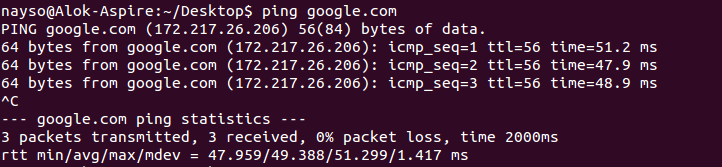
13. ping — Use ping to check your connection to a server. Wikipedia says, "Ping is a computer network administration software utility used to test the reachability of a host on an Internet Protocol (IP) network". Simply, when you type in, for example, “ping google.com”, it checks if it can connect to the server and come back. It measures this round-trip time and gives you the details about it. The use of this command for simple users like us is to check your internet connection. If it pings the Google server (in this case), you can confirm that your internet connection is active!
ddd5257793d166447c1a747704df4d84.png

Tips and Tricks for Using Linux Command Line

  • You can use the clear command to clear the terminal if it gets filled up with too many commands.
  • TAB can be used to fill up in terminal. For example, You just need to type “cd Doc” and then TAB and the terminal fills the rest up and makes it “cd Documents”.
  • Ctrl+C can be used to stop any command in terminal safely. If it doesn't stop with that, then Ctrl+Z can be used to force stop it.
  • You can exit from the terminal by using the exit command.
  • You can power off or reboot the computer by using the command sudo haltand sudo reboot.